


:quality(80)/p7i.vogel.de/wcms/53/61/53619895ee4ec91e216ceab62918f8f4/0131724438v2.jpeg "The new MX series by GES High Voltage: Handling up to 20 kV DC and supporting up to 9 poles. (Source: GES High Voltage)")
:quality(80)/p7i.vogel.de/wcms/8c/c3/8cc3f77472b8af8ca61b5bf8cb7ee8f0/0131704631v2.jpeg "ROHM launches New Top-Side Cooling Package for SiC MOSFETs, Combining High Heat Dissipation with High Voltage Support (Source: ROHM)")
:quality(80)/p7i.vogel.de/wcms/d8/ff/d8ffb208c8b62dca4424e25cf8493e00/0131667998v4.jpeg "Integrated, thermally optimized line reactor for power electronics applications. (Source: Block)")
:quality(80)/p7i.vogel.de/wcms/93/fa/93fac0d35290aa5065c18e0a132517c1/0131665788v2.jpeg "The new high performance fuses from Mersen combine the best AC/DC electrical characteristics in a single compact housing (Source: Mersen)")
:quality(80)/p7i.vogel.de/wcms/c7/05/c7057930a5fbf4e7ce7b63feecdad91c/0131786248v2.jpeg "PCIM 2026 award winners recognised for innovative, application‑focused power‑electronics research — Best Paper, Young Engineer and Young Researcher awards presented during the conference ceremony. (Source: Mesago Messe Frankfurt GmbH / Arturo Rivas Gonzalez)")
:quality(80)/p7i.vogel.de/wcms/b5/58/b55874104bf128af36ab420983a1a74f/0131625728v2.jpeg "GC01 (0.5 mm pitch) delivers floating, tolerance‑compensating board‑to‑board performance for high‑speed applications; GB05 provides secure wire‑to‑board connections for automotive and industrial systems. (Source: © WrightStudio - stock.adobe.com)")
:quality(80)/p7i.vogel.de/wcms/e3/a2/e3a2c363179aa46339ba27d0a1785217/0131622335v2.jpeg "At PCIM 2026 Mersen presents new electrical protection solutions for data centers. (Source: © nerminmuminovic - stock.adobe.com)")
:quality(80)/p7i.vogel.de/wcms/df/de/dfde53ac2f23feddfb142593b89981ed/0131617862v2.jpeg "Advanced die‑attach and solder preform solutions from MacDermid Alpha enable more repeatable manufacturing and higher reliability for automotive, industrial and AI data‑center power modules. (Source: MacDermid Alpha)")
:quality(80)/p7i.vogel.de/wcms/5c/f5/5cf53b6db2706b86ac6eb5c407704d27/0131699647v2.jpeg "This article explains inductors in electrical and electronics engineering. (Source: © Iurii - stock.adobe.com)")
:quality(80)/p7i.vogel.de/wcms/e8/b1/e8b1b3c2722724a07ec9835292cf568e/0131681282v2.jpeg "STMicroelectronics expands its PowerGaN portfolio with 700 V HEMTs (6–29 A, 53–270 mΩ typ.), delivering lower switching and conduction losses to increase efficiency and power density for AI servers, robotics and industrial power supplies. (Source: STMicroelectronics)")
:quality(80)/p7i.vogel.de/wcms/3f/77/3f77be835f67d66c9c7bbf179577577a/0131631955v2.jpeg "Inspector examination of photovoltaic modules using a thermal imaging camera (Source: © kanpisut - stock.adobe.com)")
:quality(80)/p7i.vogel.de/wcms/84/1f/841f6921da6203c30dac2963c7a0df81/0131601493v2.jpeg "New multi‑chemistry systems from CATL target fast charging, higher energy density and lightweight flexible applications, with sodium‑ion mass‑production plans announced for 2026. (Source: CATL)")
:quality(80)/p7i.vogel.de/wcms/34/4a/344a3dc5a19429cf6726b7f8f7e2ee32/0130109719v2.jpeg "Hioki’s new measurement solutions enable precise analysis of power electronics systems and energy efficiency. (Source: Hioki)")
:quality(80)/p7i.vogel.de/wcms/be/c8/bec8d43fc0ee73414274be44608b2970/0129748903v2.jpeg "The Infiniium XR804KA real-time oscilloscope delivers faster response time, improved stability, and streamlined workflows for high-speed digital and compliance testing. (Source: Keysight)")
:quality(80)/p7i.vogel.de/wcms/23/ee/23ee4a97790d6009dbfd7d9577ffa723/0129220424v2.jpeg "The R&S FPL1044 with the new RTSA option makes 40 MHz real-time frequency analysis available up to 44 GHz. (Source: Rohde & Schwarz )")
:quality(80)/p7i.vogel.de/wcms/3c/d1/3cd1cacbceb792ba63727199c61ca434/0127801860v2.jpeg "Thanks to cloud technology, users can collaborate on projects from anywhere and always have access to the latest planning data. (Source: SIEMENS)")
7 TIPS How to protect a power supply from overheating
Related Vendors
:fill(fff,0)/p7i.vogel.de/companies/6a/20/6a202a4f89a62/mrs-white-on-blue-bg.png "mrs-white-on-blue-bg ()")
:fill(fff,0)/p7i.vogel.de/companies/5f/71/5f71d5f92a5f6/2000px-rogers-corporation-logo-svg.png "2000px-Rogers_Corporation_Logo.svg.png (rogers germany)")
:fill(fff,0)/p7i.vogel.de/companies/60/21/60214fbbcc5e0/index.png "index.png (Kundenwebsite)")
A power supply is a critical component in many electronic devices, providing the necessary voltage and current for operation. Overheating is one of the main issues that can affect both the efficiency and lifespan of a power supply. In this article, we will first look at the symptoms of overheating and then provide practical tips on how to protect your power supply from overheating.
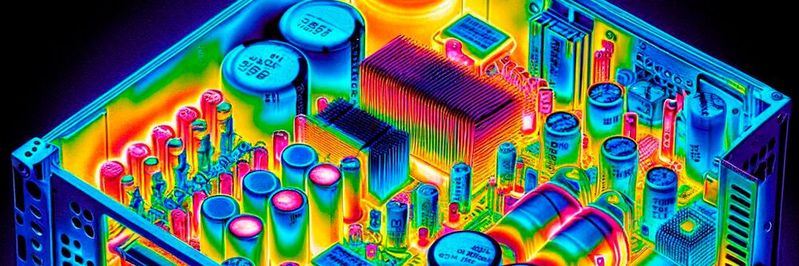
Power supplies are critical for converting alternating current (AC) from the wall outlet into the direct current (DC) that electronic devices need to operate. They typically include components such as transformers, rectifiers, capacitors and sometimes advanced switching technologies to accurately deliver and regulate the desired output voltage and current. As these components are very sensitive to heat and excessive temperatures can cause not only failures but even fires, appropriate countermeasures are essential. But before we delve into specific protective measures against overheating, it's important to recognize the typical symptoms of overheating in a power supply.
Identifying overheating symptoms in power supplies
Overheating symptoms can provide early warning signs that your power supply is at risk of failures or damage. Common overheating symptoms include unusual noises such as buzzing or clicking, often caused by thermal expansion or overloaded, overheated components. Another clear sign of overheating is a noticeable increase in the case temperature, which can be felt when placing your hand near the power supply casing. Overheating can also lead to unexpected system crashes or restarts, as many power supplies will automatically shut down when temperatures get too high to prevent damage. Additionally, there may be a reduction in power efficiency, as overheated power supplies do not operate optimally. If you notice one or more of these overheating symptoms in your power supply, it is crucial to act quickly to prevent long-term damage.
7 Tips for power supply overheating protection
1. Ensure adequate ventilation
One of the simplest and most effective ways to keep a power supply cool is to ensure it has good ventilation. The enclosure in which the power supply is installed should allow air to circulate freely. Avoid blocking ventilation openings and keep the device away from other heat sources. If possible, use additional fans to increase air circulation.
2. Check and clean fans regularly
Most power supplies come equipped with fans that help maintain a low internal temperature. Make sure these fans are functioning and free of dust and debris. Regular cleaning of the fans and the power supply itself can significantly improve heat dissipation.
3. Use high-quality components
High-quality components such as solid capacitors and robust transformers can better withstand heat. When selecting or assembling a power supply, look for products with a good rating in terms of thermal performance and durability.
4. Monitor the temperature
It is important to monitor the temperature of the power supply, especially in environments prone to high temperatures. Thermal sensors can help monitor the temperature and trigger warnings if necessary. Some advanced power supplies have built-in overheating protection features that automatically shut down if a certain temperature threshold is exceeded.
:quality(80):fill(efefef,0)/p7i.vogel.de/wcms/60/c2/60c259c900a1f/wp-vorschaubild-analog-devices-wp-lg-pb-2021.png "WP_Vorschaubild_Analog_Devices_WP_LG_PB_2021")
5. Use a thermal sparator
A thermal separator is a type of insulation material that helps minimize heat transfer between the power supply and other parts of the device. This can be particularly useful in compact devices where the power supply is close to heat-sensitive components.
6. Optimize power consumption
A power supply that consistently operates at its limit is more prone to overheating. It is advisable to use a power supply with a higher power capacity than actually needed. This allows the power supply to operate under less stressful conditions and helps reduce operating temperature.
7. Consider environmental conditions
The environment in which the power supply operates plays a significant role in heat regulation. High ambient temperatures, humidity, and dust can negatively affect the power supply's ability to cool itself. Adjust cooling strategies accordingly to ensure that the power supply operates effectively under adverse conditions.
Conclusion
Maintaining an optimal operating temperature for your power supply is crucial for the reliability and lifespan of your electronic devices. By implementing the above tips, you can optimize the performance of your power supply and minimize the risk of overheating. Safety and efficiency in your electronic setup start with the proper care and handling of the power supply.
(ID:50005147)
:quality(80)/p7i.vogel.de/wcms/9a/af/9aafa5ad3d3d900a6e22adf6d06a9bf5/0126877798v2.jpeg "The image shows Data Centers optimized with thermal management- (Source: © Mariya - stock.adobe.com)")
:quality(80)/p7i.vogel.de/wcms/01/7f/017f6240f46d30fb41ba6b48f7f08ea9/0127334265v4.jpeg "The Peltier effect describes how, at the junction between two different conductors or semiconductors, heat is either absorbed or released when an electric current flows through — meaning that electricity can directly produce cooling or heating. (Source: © Meheraj Hosen Mahid - stock.adobe.com)")