


:quality(80)/p7i.vogel.de/wcms/2f/f3/2ff3221bf7665de2d0acf83760bfd1fa/0130031523v2.jpeg "Wolfspeed presents a 300 mm silicon carbide technology platform designed to support advanced packaging and high-efficiency power delivery for AI data center infrastructure. (Source: Wolfspeed)")
:quality(80)/p7i.vogel.de/wcms/c3/16/c316e955a97f5d72d9678297b237b9e5/0129932858v2.jpeg "Left: the single-phase version of the SENTRON ECPD with RCM, right: a model of the future three-phase version of the SENTRON ECPD. (Source: Siemens)")
:quality(80)/p7i.vogel.de/wcms/ef/0a/ef0adb0acf793fe147cc27c21f6a7a67/0129954238v2.jpeg "Empower Semiconductor introduces embedded silicon capacitors designed to improve power delivery and stability in AI and high-performance computing processors. (symbolic image) (Source: © IF.arc - stock.adobe.com)")
:quality(80)/p7i.vogel.de/wcms/53/f9/53f9301dfc9292d02960f7996c79cc6e/0129927601v2.jpeg "Wolfspeed’s new 10 kV SiC MOSFET enables high-voltage power conversion for grid and industrial applications. (symbolic image) (Source: © CREATIVE- 3.4 - stock.adobe.com)")
:quality(80)/p7i.vogel.de/wcms/6e/cd/6ecd41d095d5111cf4ed37b714844487/0129930878v2.jpeg "PCIM Asia Shenzhen provides a platform for industry experts to present new developments in power electronics and electrification technologies. (symbolic image) (Source: © killykoon - stock.adobe.com)")
:quality(80)/p7i.vogel.de/wcms/02/c0/02c0e9722f70b1134dbf96fb59a9c73d/0129655179v2.jpeg "The PCIM Conference 2026 will take place from June 9-11, featuring discussions on power electronics trends, including GaN technology and AI applications. (symbolic image) (Source: © Elmira - stock.adobe.com)")
:quality(80)/p7i.vogel.de/wcms/cc/67/cc670ea2029cd2af5c641af70e1bf734/0129816392v4.jpeg "Fraunhofer IAF coordinates the EU SUPREME project to accelerate GaN and SiC power semiconductor innovation in Europe. (Source: Fraunhofer IAF)")
:quality(80)/p7i.vogel.de/wcms/ea/e6/eae6aee30071e67a5627027974437134/0129544613v2.jpeg "GlobalFoundries and Renesas strengthen their collaboration to support U.S.-based semiconductor production and supply chain resilience. (Source: © ronstik - stock.adobe.com)")
:quality(80)/p7i.vogel.de/wcms/23/1a/231a97643aa7fc3adf2704a6273756c3/0130030642v2.jpeg "Gallium nitride (GaN) power devices are increasingly challenging silicon MOSFETs in low-voltage power conversion by enabling higher efficiency and switching performance. (Source: © Sheraz - stock.adobe.com)")
:quality(80)/p7i.vogel.de/wcms/3c/4b/3c4bbc68dda65c7071b4376fb57423b0/0130030465v2.jpeg "Faraday’s laws explain the fundamental behavior of magnetic fields and electronic devices in dynamic use cases. The operation of transformers, wireless chargers, induction cookers, induction motors, magnetic levitating trains (MAGLEV Trains), electric violin, and many others depends upon Faraday’s laws. (Source: © Sheraz - stock.adobe.com)")
:quality(80)/p7i.vogel.de/wcms/b1/5e/b15ee02b0ba02db70cf61e37d66ad1d3/0129349127v2.jpeg "Vehicle-to-grid (V2G) chargers enable bidirectional energy flow, allowing electric vehicles to act as mobile energy storage systems that can both draw power from and feed power back into the grid. (Source: © medienvirus - stock.adobe.com)")
:quality(80)/p7i.vogel.de/wcms/26/d5/26d591cc340077026eac56a0e7564faf/0129949603v2.jpeg "Flexible: The solid silicone-based electrolyte is elastic, thereby compensating for the voids that form in solid-state batteries during charging and discharging. (Source: Empa)")
:quality(80)/p7i.vogel.de/wcms/be/c8/bec8d43fc0ee73414274be44608b2970/0129748903v2.jpeg "The Infiniium XR804KA real-time oscilloscope delivers faster response time, improved stability, and streamlined workflows for high-speed digital and compliance testing. (Source: Keysight)")
:quality(80)/p7i.vogel.de/wcms/23/ee/23ee4a97790d6009dbfd7d9577ffa723/0129220424v2.jpeg "The R&S FPL1044 with the new RTSA option makes 40 MHz real-time frequency analysis available up to 44 GHz. (Source: Rohde & Schwarz )")
:quality(80)/p7i.vogel.de/wcms/3c/d1/3cd1cacbceb792ba63727199c61ca434/0127801860v2.jpeg "Thanks to cloud technology, users can collaborate on projects from anywhere and always have access to the latest planning data. (Source: SIEMENS)")
:quality(80)/p7i.vogel.de/wcms/5a/a0/5aa0436498af618297961fd54ab36cdf/0126290792v2.jpeg "Siemens accelerates student-led semiconductor innovation across Europe’s leading technical universities through Cre8Ventures’ Open Higher Education Program developed in collaboration with Arm and University of Southampton (Source: Siemens Digital Industries Software)")
PRINTED CIRCUIT BOARD PCB Fabrication Drawing
Related Vendors
:fill(fff,0)/p7i.vogel.de/companies/62/b9/62b980cddf5d6/ceramtec.png "ceramtec (www.ceramtec-group.com)")
:fill(fff,0)/p7i.vogel.de/companies/60/7e/607ec89d5d9b5/white-frame.jpg "white frame.jpg (www.rohm.com)")
:fill(fff,0)/p7i.vogel.de/companies/5f/71/5f71d5f92a5f6/2000px-rogers-corporation-logo-svg.png "2000px-Rogers_Corporation_Logo.svg.png (rogers germany)")
Fabrication notes, Drill Table, Scaled Drawing, Stackup Drawing and Array Drawing are all parts of a PCB fabrication drawing. But what is a fabrication drawing and why do you need it? This article will teach you all you need to know about this topic, and give you examples of best practices.
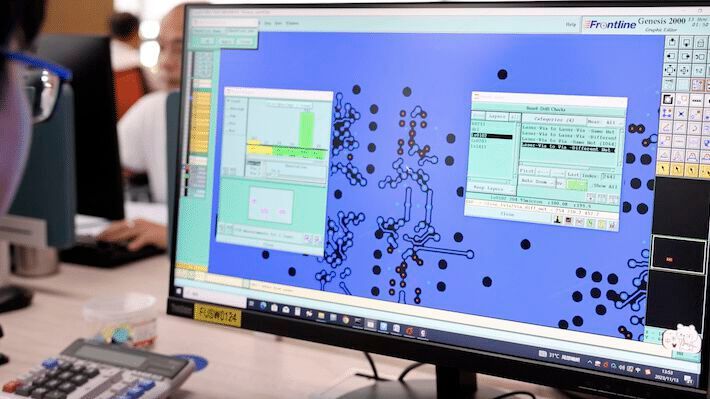
Unlike the components that are soldered to PCBs, circuit boards are custom manufactured goods that take time to design and build. The more complex a PCB is, the more fabrication documentation is required. Regardless of the PCB’s complexity, a fabrication drawing will speed up the manufacturing process by answering many questions a PCB supplier would have. The supplier will use the fabrication drawing in conjunction with the PCB manufacturing data for verification.
Fabrication Drawing – The Purpose
The purpose of the fabrication drawing is simple: it serves as a blueprint for the PCB. There is no “one size fits all” solution to building a PCB, as each board has unique manufacturing and quality requirements. These must be specified by the user. The fabrication drawing is also used for verification, as CAD systems sometimes generate bad data, which is often unknown until the Design for Manufacture analysis at the factory. Additionally, the fabrication drawing is used for qualification, allowing quality personnel to ensure the PCBs meet all IPC specifications during final inspection.
Fabrication Notes
The fabrication notes serve as a tool for PCB design engineers to specify the fit, form, and function of the final product. In addition, the fabrication notes are communication between the PCB designer and fabricator. Engineers can also use the fabrication notes to control the quality of the PCB. This section of the PCB fabrication drawing should provide accurate specifications for the finished PCB. In order to maximize the effectiveness of the fabrication notes, a PCB design engineer should be familiar with the IPC specifications. The Qualification and Performance Specification for Rigid Printed Boards, IPC-6012, provides design engineers many options to specify on the finished PCB.
Specify a quality class of the PCB
For example, when specifying the surface finish, engineers can also specify the durability of the surface finish. This is vital to ensure the PCB can withstand storage and the amount of heat cycles necessary for assembly. This example also illustrates how the IPC specifications are used in conjunction with each other as IPC-6012 refers to the Joint Industry Standard -003 (J-STD-003). Another way to control quality, and cost, is to specify a quality class of the PCB. For example, IPC-6012 Class 3 may be required for a high reliability PCB, whereas Class 1 and 2 will have less quality requirements and inspection points. Moreover, Class 1 and Class 2 will also demand lower overall cost. It is common in the PCB industry to see circuit boards specified to meet the Class 2 manufacturing requirements, but manufactured with some Class 3 requirements, like plating.
A great way to specify base materials is to look at the base material specifications from IPC. IPC-4101 and IPC-4202 use “slash sheet numbers” to identify and categorize PCB materials based on material grade.
It is very important for the notes to be written as simple and as clearly as possible. Vague or open-to-interpretation notes can lead to manufacturing delays or errors, resulting in unnecessary costs and lost time.

Drill Table
The drill table is another element of the fabrication drawing used for design verification. It lists all the holes to be drilled into the PCB, including their sizes, quantities, tolerances, and symbols that match the drill drawing artwork. These symbols indicate the placement of each hole on the PCB. PCB designers can also add extra information, such as for blind and buried vias, to minimize questions. Sometimes CAD systems generate mistakes that are out of our control or unknown to us, so spending extra time on this area provides additional assurance.
Scaled Drawing
Part of the fabrication drawing should be reserved for a scaled PCB outline drawing. This drawing should provide an accurate outline for the PCB. You might be thinking that a simple scaled PCB outline will work for many designs, but to make the best fabrication drawing possible, more details are needed. In addition to the outline, scaled dimension lines should be added, and a good drawing will include an origin point for the manufacturer to reference.
Always check the scaling first. Often, the customer’s CAD system was incorrectly configured for Gerber data output, causing the physical layers to be scaled differently than the drill files. When the PCB dimensions were included, you could figure out the issue rather quickly. Although this is a small reference to add, it is useful.
However, adding too many dimension lines can crowd the drawing and make it unreadable. It’s best to include only overall and critical dimensions.
:quality(80)/p7i.vogel.de/wcms/49/41/49414aec54b828f2484e3bf80ad0634d/0100423163.jpeg "PCBs are some of the most crucial electronics components in modern devices, so it’s no surprise that their design phase can be complex. (Source: ©spainter_vfx - stock.adobe.com)")
PRINTED CIRCUIT BOARDS
What’s involved in the process of PCB design?
Stackup Drawing
A stackup drawing (or simply “stackup”) is a detailed cross-section image of the PCB. While not always needed in every PCB design package, some designs require specific information. For a two-layer PCB, a designer can list the finished board thickness and tolerance in the fabrication notes. However, some designs will need a stackup drawing with specific details.
PCB designers can specify the layer arrangement, but some PCB design packages fail to be this simple.
PCB designers can specify finished copper thicknesses for each layer. This is great information as long as it’s accurate. However, there have been stackups that specify copper thicknesses for internal layers that did not match standard manufacturing thicknesses. This is acceptable if it’s mutually agreed upon between the user and supplier (AABUS). Listing non-standard copper thicknesses without reasoning can generate questions and place the board on hold in engineering, as non-standard manufacturing will likely add more lead time and cost to the PCB.
Include material type in the stackup drawing
PCB designs with blind, buried, and/or back drilled vias can have complex drill sequences. A drawing showing all the drill sequences will inform the PCB supplier about the number of press and drill cycles before final inspection, eliminating the need for guesswork. While a supplier can determine each segment from the PCB artwork, an educated guess is still a guess.
The stackup should also include the material type and finished dielectric thickness of the PCB materials. This information is usually only necessary for PCBs with controlled impedance requirements. The material type and dielectric thickness help control impedance traces, and with careful planning, engineers can minimize Electromagnetic Interference (EMI) and crosstalk through strategic reference plane placement.
The stackup drawing is a great way to document Controlled Impedance specifications. The best impedance trace callouts are placed in a table, identifying the impedance traces on every layer. The table should also include trace width, space for structures, target impedance value, and the layers each trace will reference.
Some PCBs have thermal management specifications like Insulated Metal Substrate (IMS) or Copper Coin Technology. Copper coins and metal substrates come in various shapes and sizes. The stackup drawing is a good way to show the thickness and shape of the coins and the details of the IMS technology, such as thermal dielectric and metal substrate thickness.
:quality(80)/p7i.vogel.de/wcms/ac/c6/acc69b572603f02f24280aea5cdba9b2/96788278.jpeg "Deciding which PCB design software package is best depends very much on your personal perspective: the complexity and size of your project, your budget, your expertise, and whether you are working alone or as part of a team are all factors. (Source: ©Lev - stock.adobe.com)")
PCB DESIGN PACKAGES
How to choose the right printed circuit board design package
Array Drawing
The array drawing is a scaled drawing illustrating the number of circuit boards in each array. It should depict dimension measurements and have accurate spacing between each PCB. The rails of an array should have at least three fiducials used by factory machines to maintain accuracy through assembly. If thieving is needed to ensure more uniform plating across the panel, the rails are a good place to add it without affecting the circuit board.
The array helps with cost and quality control. Processing all PCBs in an array ensures consistency throughout the lot and is more cost-efficient than handling single units. Optimizing the array to minimize waste material can drive costs down, but be cautious: too many PCBs on a single array or removing too much waste material can make the array unstable and cause it to fall apart before assembly. Optimizing the array for efficient assembly can reduce costs and waste.
Sooner or later, the circuit board may need revisions. An updated fabrication drawing will reduce front-end engineering time. Many engineers and buyers complain about the time a PCB spends in front-end engineering. This gives the customer more control during this time. Besides updating the fabrication drawing, be cautious when specifying redundant information across several sheets. Greater redundancy increases the risk of missing something during revision, leading to additional questions and longer lead times.
It’s a great feeling when the PCB fabrication drawing is complete. The drawings should be clear and concise while containing all pertinent information. If details distract from the meaning of the note or drawing, it may be better to revise it. Circuit boards are custom designs. The PCB supplier knows how to manufacture PCBs, but they may not have manufactured your particular design. This will require some questions, but the goal of the PCB fabrication drawing is to minimize these questions. Optimizing this part of the design is time-consuming, but it is worth it for better quality, cost, and lead times.
This article was first published on the homepage of NCAB Group.
(ID:50267129)
:quality(80)/p7i.vogel.de/wcms/f0/a4/f0a4ec50e99b87afad613593f0f0860b/0124997238v4.jpeg "Surface treatments are crucial for automotive power electronics, enhancing durability, thermal management, corrosion resistance, and electrical connectivity, thus ensuring reliable performance and longevity in harsh conditions. (Source: © Alfath - stock.adobe.com)")
:quality(80)/p7i.vogel.de/wcms/36/9f/369fecb632ba6b56c437bc07ce398bc9/0124578282v2.jpeg "Power rails deliver essential supply voltage to devices and processors, ensuring functionality as high-speed structures distinct from DC voltage lines. Find out more here. (Source: © VibrantLens - stock.adobe.com)")